Looking into feast, the open source feature store, and whether there is support for using feast as an interface around parquet and or delta tables, with use in a pyspark batch inference databricks environment. I see that parquet is mentioned in the quickstart2, using parquet as the offline component and using sqlite as the online store component. The offline store component is described as intended for training. Maybe it can be useful for a batch inference case too?
I wonder what it means that the FileSource3 is described as “for development purposes only and is not optimized for production use.”.
However it does also look like a path-based SparkSource4 is also available .
from feast.infra.offline_stores.contrib.spark_offline_store.spark_source import (
    SparkSource,
)

my_spark_source = SparkSource(
    path=f"{CURRENT_DIR}/data/driver_hourly_stats",
    file_format="parquet",
    timestamp_field="event_timestamp",
    created_timestamp_column="created",
)
And liking that the offline spark store implements5 both get_historical_features and pull_latest_from_table_or_query, making me hopefful that this can be helpful for both batch inferencing and training needs.
Registry
There is a concept of a metadata store6,7, to define feature store views and entities. The registry can be used to list/retrieve/delete metadata either with a file (using protobuf, sqlite db) or sql ( postgresql). The metadata store registry is defined in a feature_store.yaml, with registry: data/registry.db or registry.pb for the file case or with a sql definition like:
project: <your project name>
provider: <provider name>
online_store: redis
offline_store: file
registry:
    registry_type: sql
    path: postgresql://postgres:mysecretpassword@127.0.0.1:55001/feast
    cache_ttl_seconds: 60
you can then programmatically refer to the registry, for listing, updates.
repo_config = RepoConfig(
    registry=RegistryConfig(path="gs://feast-test-gcs-bucket/registry.pb"),
    project="feast_demo_gcp",
    provider="gcp",
    offline_store="file",  # Could also be the OfflineStoreConfig e.g. FileOfflineStoreConfig
    online_store="null",  # Could also be the OnlineStoreConfig e.g. RedisOnlineStoreConfig
)
store = FeatureStore(config=repo_config)
And the docs7 discuss a separate registry for staging and production, where the latter is more locked down for editing.
But importantly also, this metadata store is recommended to be version controlled in git, across updates!
Adding features
Adding features is referred to as feature registration8. and again “Offline feature retrieval for batch predictions” is once again called out using get_historical_features and the same API call is also referred to for “Training data generation”, which logically makes a lot of sense!
Feast refers to Entities9 as groups of related features.
But features can be retrieved as Feature Views10 whether or not they are related to each other as logical entities.
Transformations: Bronze->Silver
In feast, transformations are the concept of taking raw data sources and creating derived ones, with custom modifications and or joins.
On the architecture page11, there is a quote,
Feast supports feature transformation for On Demand and Streaming data sources and will support Batch transformations in the future.
which sounds like some of their batch API might be in-progress?
Also feast considers an Offline Store (SnowFlake and Spark mentioned) to be Transformation Engines12:
For Streaming and Batch data sources, Feast requires a separate Feature Transformation Engine (in the batch case, this is typically your Offline Store).
But feast also considers a Compute Engine13 to be a Transformation Engine, naming spark DAGs, in particular. Databricks is not mentioned by name I think but feast seems to just be a simple OOPs abstraction layer where you define your transformations underneath named implementations .
A Compute Engine is an abstraction
The Compute Engine14 implements
materialize()– for batch and stream generation of features to offline/online storesget_historical_features()– for point-in-time correct training dataset retrieval
Copying from their docs, here is how they want you to define a Compute Engine of your own:
from feast.infra.compute_engines.base import ComputeEngine
from typing import Sequence, Union
from feast.batch_feature_view import BatchFeatureView
from feast.entity import Entity
from feast.feature_view import FeatureView
from feast.infra.common.materialization_job import (
    MaterializationJob,
    MaterializationTask,
)
from feast.infra.common.retrieval_task import HistoricalRetrievalTask
from feast.infra.offline_stores.offline_store import RetrievalJob
from feast.infra.registry.base_registry import BaseRegistry
from feast.on_demand_feature_view import OnDemandFeatureView
from feast.stream_feature_view import StreamFeatureView


class MyComputeEngine(ComputeEngine):
    def update(
        self,
        project: str,
        views_to_delete: Sequence[
            Union[BatchFeatureView, StreamFeatureView, FeatureView]
        ],
        views_to_keep: Sequence[
            Union[BatchFeatureView, StreamFeatureView, FeatureView, OnDemandFeatureView]
        ],
        entities_to_delete: Sequence[Entity],
        entities_to_keep: Sequence[Entity],
    ):
        ...

    def _materialize_one(
        self,
        registry: BaseRegistry,
        task: MaterializationTask,
        **kwargs,
    ) -> MaterializationJob:
        ...

    def get_historical_features(self, task: HistoricalRetrievalTask) -> RetrievalJob:
        ...
Versioning?
Prompting the docs about versioning:
What is the feast solution to the problem of having a feature “feature_nice”, and then wanting to change the code and version the feature ideally. Should you create “feature_nice_v2” or does feast have another versioning capability?
And response is feast only implicitly supports new named features.
And aside from metadata tags on features, no deprecation path is present.
Maybe deprecation warning can be added into tags or description?
Wonder also, how to define what dates shohld a feature be valid for?
There used to be a “feature set versioning” concept but it was removed in 202015, and discussion16 says people didnt use this, they wanted the latest.
They wrote data scientist feedback that any backfill issues should be habdled behind the scenes. There was an RFC17 on removing versioining too, summarizing the reasoning.
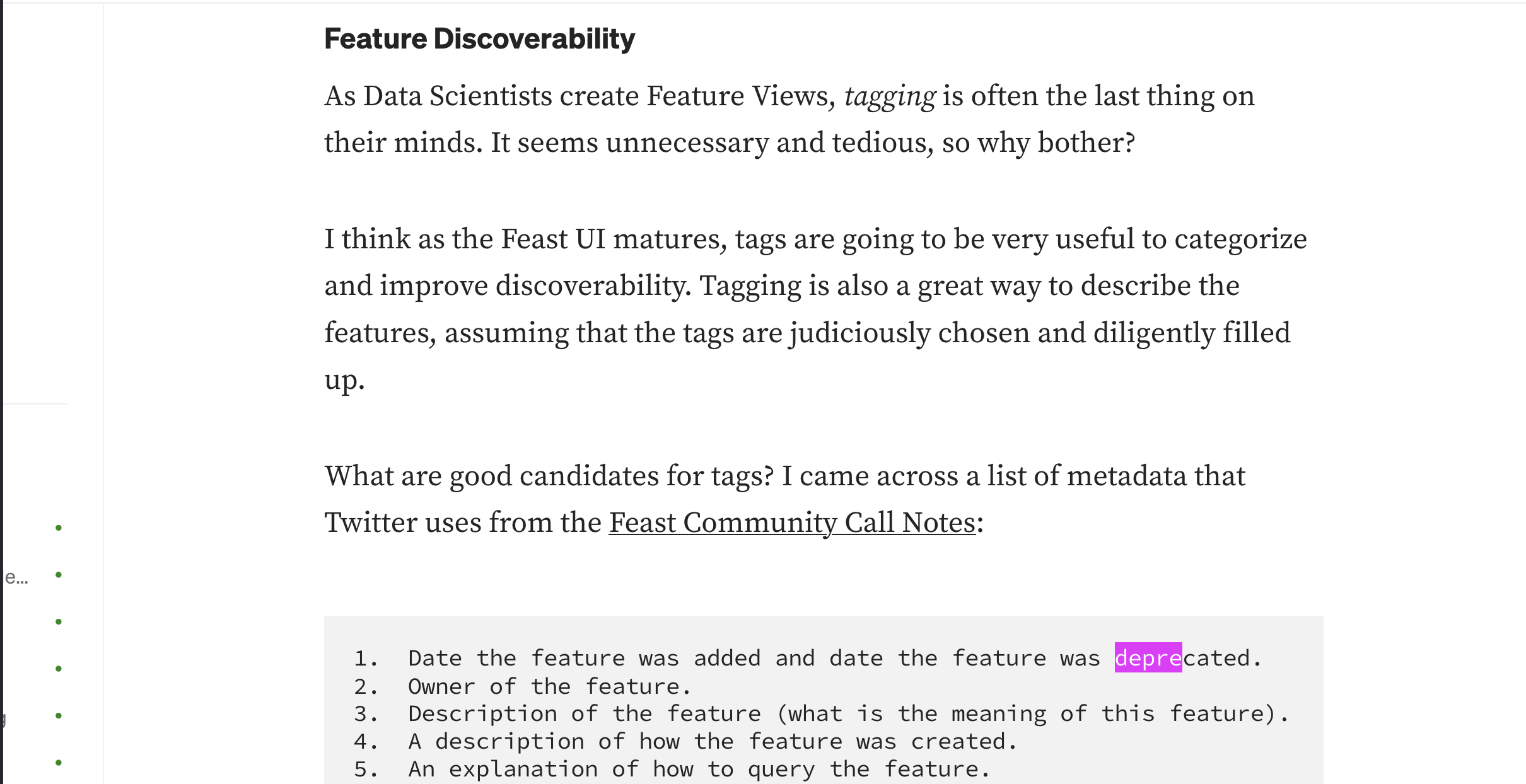
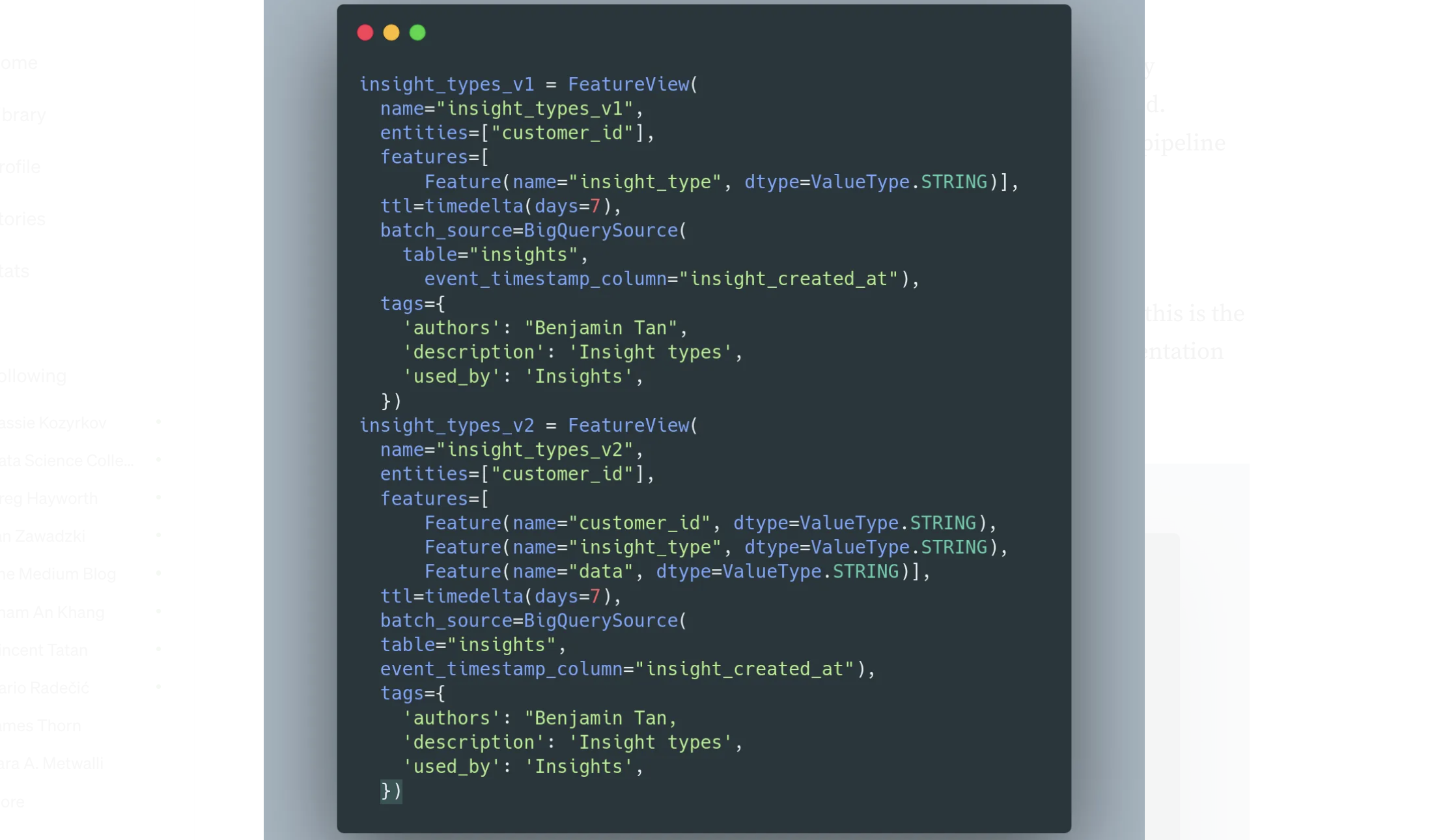
So feature versioning was removed in 2020 and here in 2022 a medium post18
, author talks explicitly about using feature views with _v1, _v2 and using the tags for many things among them deprecation as number 1.
The same author describes versioning with feast in another post19 too:
Also feature views have a TTL10 ! how far back are you allowed to go. Maybe that is another mechanism for helping you to error if you are trying to access a feature too far back.
Learning Feast
[25]
References
- https://docs.feast.dev
- https://docs.feast.dev/v0.14-branch/getting-started/quickstart
- https://docs.feast.dev/v0.27-branch/reference/data-sources/file
- https://docs.feast.dev/v0.27-branch/reference/data-sources/spark
- https://docs.feast.dev/v0.27-branch/reference/offline-stores/spark#functionality-matrix
- https://docs.feast.dev/v0.27-branch/reference/offline-stores/spark#example
- https://docs.feast.dev/v0.27-branch/getting-started/concepts/registry
- https://docs.feast.dev/v0.27-branch/getting-started/concepts/overview#feature-registration-and-retrieval
- https://docs.feast.dev/v0.27-branch/getting-started/concepts/entity
- https://docs.feast.dev/getting-started/concepts/feature-view
- https://docs.feast.dev/getting-started/architecture/overview
- https://docs.feast.dev/getting-started/architecture/feature-transformation#feature-transformation-engines
- https://docs.feast.dev/reference/compute-engine
- https://docs.feast.dev/reference/compute-engine
- https://github.com/feast-dev/feast/issues/462
- https://github.com/feast-dev/feast/issues/386
- https://docs.google.com/document/d/1P44LHd724JloQtpn10naAg5MlzcrkeOlN3QzAn9O8uY/mobilebasic
- https://medium.com/dkatalis/implementing-a-feast-linter-33e62f97c402
- https://medium.com/dkatalis/common-feature-store-workflow-with-feast-6698ea666fe8
- https://github.com/feast-dev/feast-workshop